For Belgian accountancy firms
Company valuations, wisely weighed
Weegwijs replaces the valuation workbook with a guided wizard in eight steps: from the imported trial balance to a finished PDF report, with every figure computed exactly.
Imports from Silverfin
 Exact Online

- 8guided steps, from the import to the report
- 5closed financial years imported and mapped
- 3languages: screens, report and Excel export
- 0,00rounding difference: exact decimal arithmetic
How it works
Eight steps, in the order you already work
Each step is one sheet: the inputs on the left, a result beside them that recalculates as you type. The sidebar keeps the outcome of every step in view.
1. Import
Pick the company on Silverfin or Exact Online. The trial balances of its last five closed years are imported and mapped to the income statement and the balance sheet.
2. Company and sector
Set the sector. Betas come from Damodaran, market multiples from M&A Monitor and Aeternus.
3. Normalisations
Correct one-off and non-market items, year by year, to arrive at recurring earnings.
4. Investments and forecast
Enter the investments and the assumptions behind a three-year forecast for the discounted cash flow.
5. Discount rate
Build the WACC from the risk-free rate, the premiums and a company-specific risk.
6. Adjusted equity
Correct the book equity and add goodwill.
7. Methods and weights
Weigh DCF, market multiples, the asset-based and the earnings value. The weighted average is rounded and never falls below an EBITDA floor.
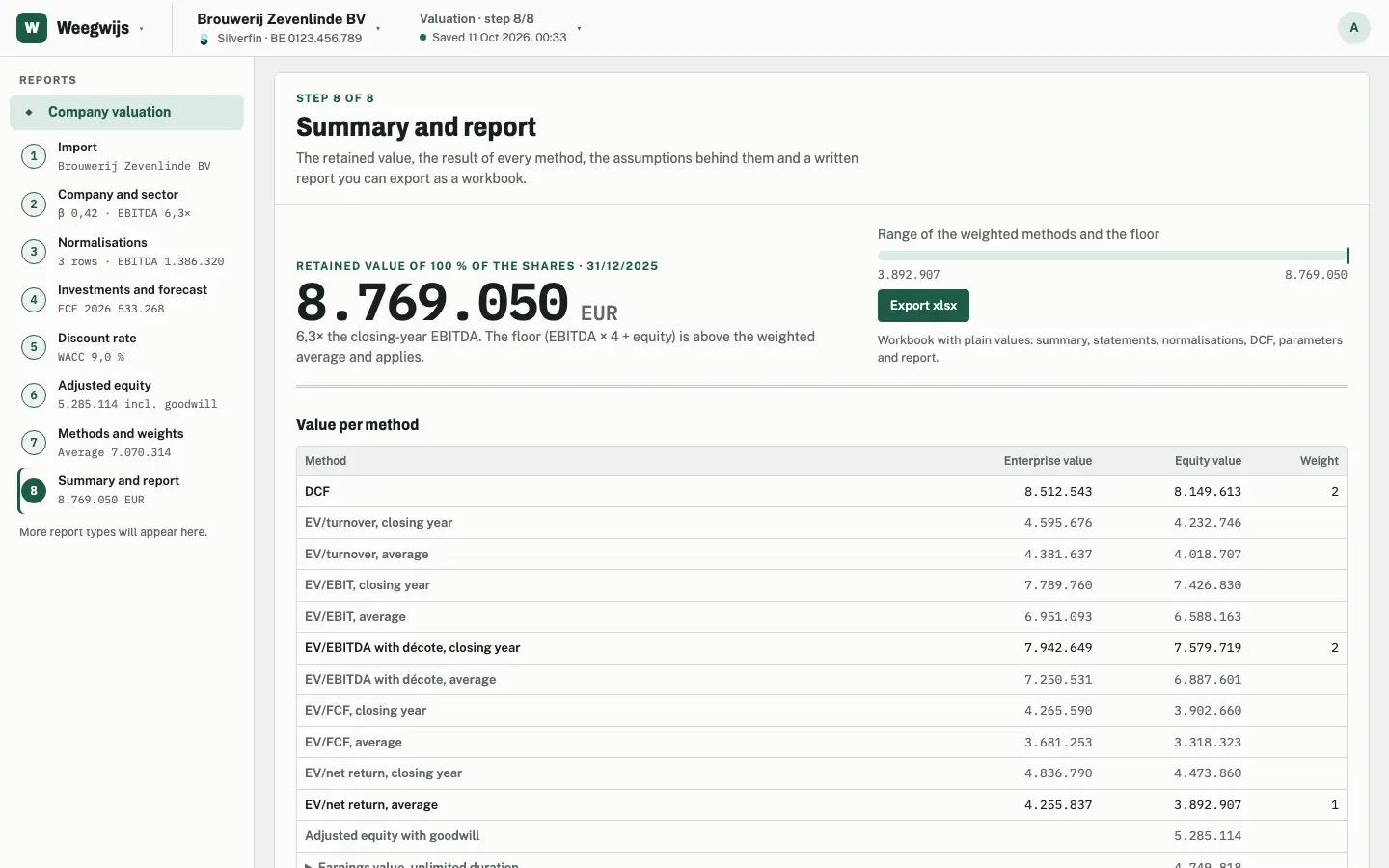
8. Summary and report
Review the retained value and every method side by side, then finish the report in PDF or export to Excel.
Integrations
Starts from the books you already keep
Connect Silverfin or Exact Online once for your team. From then on, every member can import any company the connection gives access to.


- The trial balance of the last five closed financial years, mapped automatically to the statements.
- Company details such as the enterprise number and the registered office come along.
- Reopen step 1 and the import refreshes with the latest figures.
- Find any company on your connected platforms by name or enterprise number.
Silverfin and Exact Online are trademarks of their respective owners. Weegwijs is independent and not endorsed by them.

The report
A report your client can read, with your last word in it
Weegwijs writes the valuation report in the client's language: English, Dutch or French. You read it, adjust it and send it under your own letterhead.

Edit paragraph by paragraph
Rewrite any paragraph of the generated text, or reset it to the original. The figures always come from the calculation.
Live preview
The PDF is redrawn next to the editor while you type, and keeps your place.
Your letterhead
The firm's name, details and logo in the header and footer of every page.
Excel too
Export the valuation as a workbook: summary, statements, normalisations, DCF, parameters and report.
Report template
One layout for the whole team
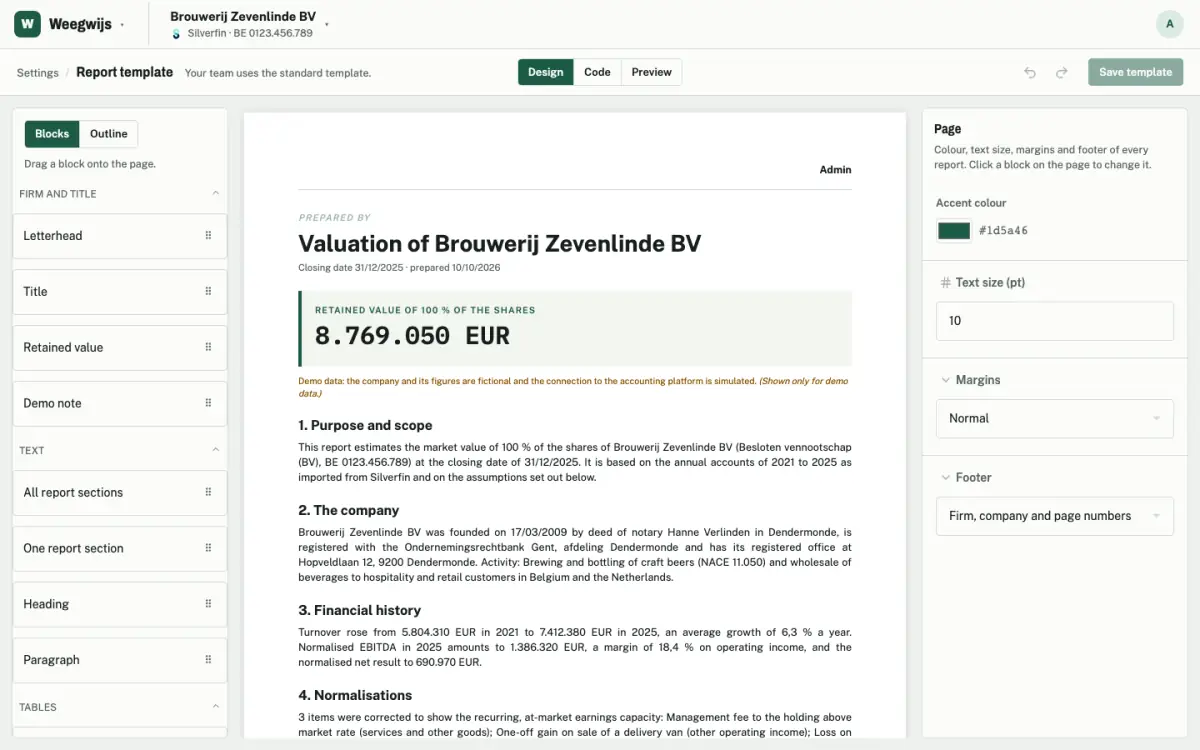
Decide once how your firm's reports look. Every valuation the team makes follows it.
- Letterhead, title, retained value, sections, your own headings and paragraphs, tables and page breaks.
- Accent colour, text size, margins and footer.
- Drag and drop the blocks, or edit the same template as JSON.
The template editor works on desktop.
Built for accountants
Figures you can stand behind
A valuation is only as good as its arithmetic. Weegwijs computes every figure on the server, with exact decimals, and matches the workbook it replaces to the cent.
Three languages, throughout
Screens, report and Excel export in English, Dutch and French. Everyone works in their own language; the report speaks the client's.
Teams
Owners and members, with invite links for colleagues. Platform connections and settings belong to the team.
Firm defaults
Set growth, tax, discount-rate inputs, multiples and weights once. Every new valuation starts from them.
Any notation
Type 1.234.567,89, 1,234,567.89 or 1 234 567: Weegwijs reads them all.
Desktop and phone
Prepare the valuation at your desk, check a figure on your phone.
Figures stay figures
The browser only shows what the server computed. Nothing is recalculated or rounded along the way.
Weigh your next valuation wisely
Create an account for your firm, connect your accounting platform and invite your colleagues.